MyToolBox collects the cost center right where the spend happens — at the IMS, as the item is issued. No back-office guesswork, no month-end reconciliation. Just clean, attributable tooling cost by job, part or department.
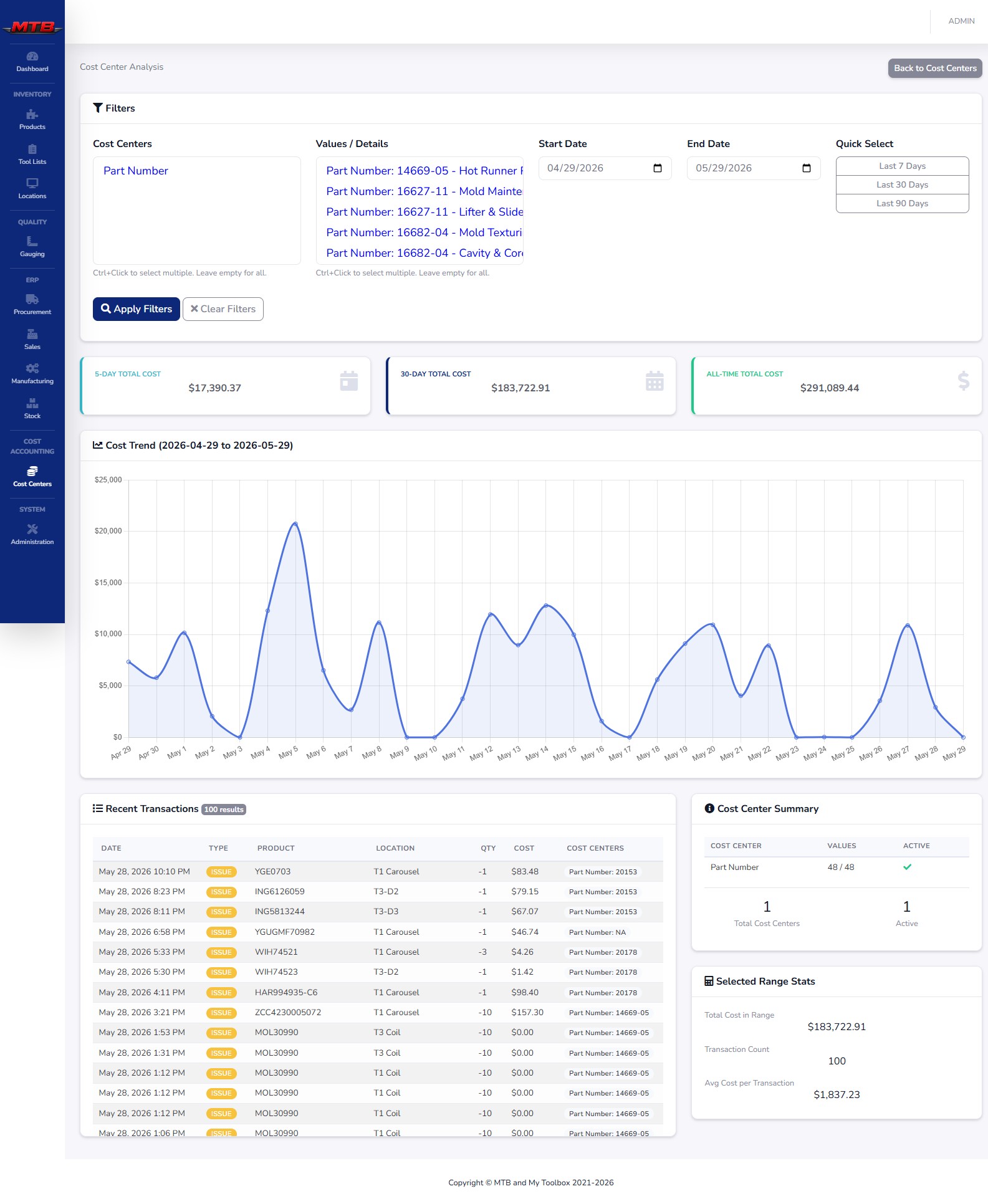
Tool lists and cost centers both flow to the IMS screen. The allocation is captured at the machine, at the point of issue — the operator answers the question as the item leaves the cabinet, and that tag travels with the transaction for the rest of its life.
Jobs, parts, departments
Collected on the IMS
Never lost or guessed
Trends & drill-downs
Filter by cost center and date range, watch the trend, and drill into the individual transactions behind every dollar — with 5-day, 30-day and all-time rollups always in view.
Quote the next job with confidence — you finally know what tooling the last one actually consumed.
Spend rolls up to the team or cell that incurred it, so budgets mean something.
Allocation happens at issue, not in a spreadsheet weeks later. The data is right because it's captured at the source.
We'll tag a few issues to jobs and show the spend roll up in real time.
 MyToolBox